LIVEEarly Access since Oct 9, 2026Game v0.1.50.17746Steam reviews Very Positive · 91% (209)Facts checked Oct 11, 2026Patch notes →
SHOP & KITCHEN LAYOUT · STEAM EARLY ACCESS

Japanese Ramen Simulator Layout Planner: Stations, Seating & Flow (2026)

Plan your Japanese Ramen Simulator shop in Steam Early Access (v0.1.50.17746, live since Oct 9, 2026). Free interactive planner, site-model flow score, and a frame guide to green/red placement UI.

Rush-hour kitchen flow · Shop customization · Changelog

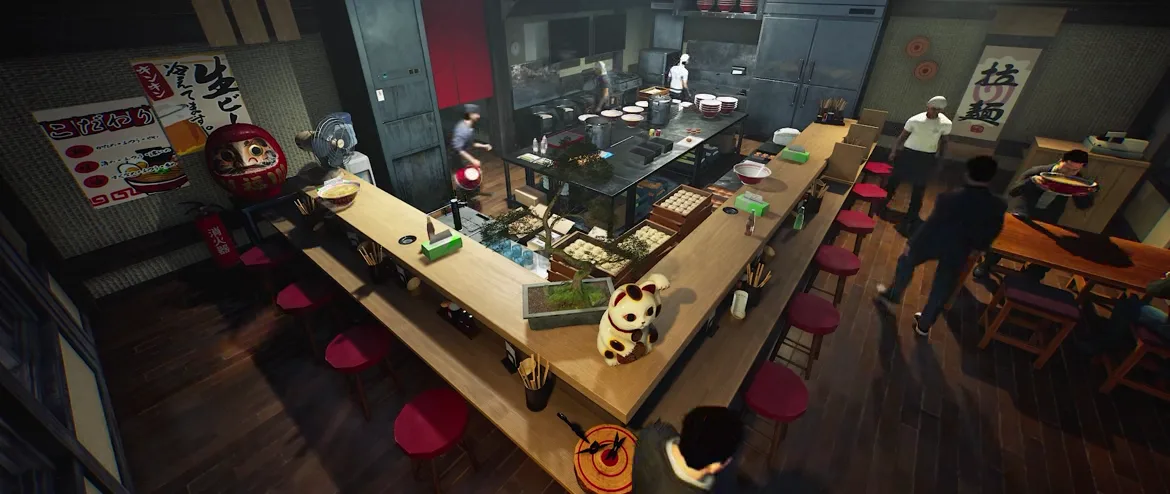
Japanese Ramen Simulator high-angle view of a finished ramen shop from the official store footage, showing an L-shaped wooden bar counter lined with red round stools and a lucky cat, the open kitchen island with a chef at the pass, tall stainless cabinets, dining tables on the right and wall posters plus a 拉麺 hanging scroll
📸 The only top-down look at a whole shop in the official clips — the reference for every layout decision below.▶ Layout Planner · Steam

What we know about placement (Early Access)

Japanese Ramen Simulator is in Steam Early Access since Oct 9, 2026 (current build v0.1.50.17746). You can freely place equipment and furniture in-game. Frame captures below come from the in-engine clips on the Steam store page — green/red placement ghosts, station types and seating are visible there; pre-release preview footage may differ from your live build, so treat clips as observed reference and follow the Day 1 patch notes on /changelog for build-mode changes. The interactive planner score is a site-model heuristic, not an in-game number.

Placement systemFree placement + ghost highlight

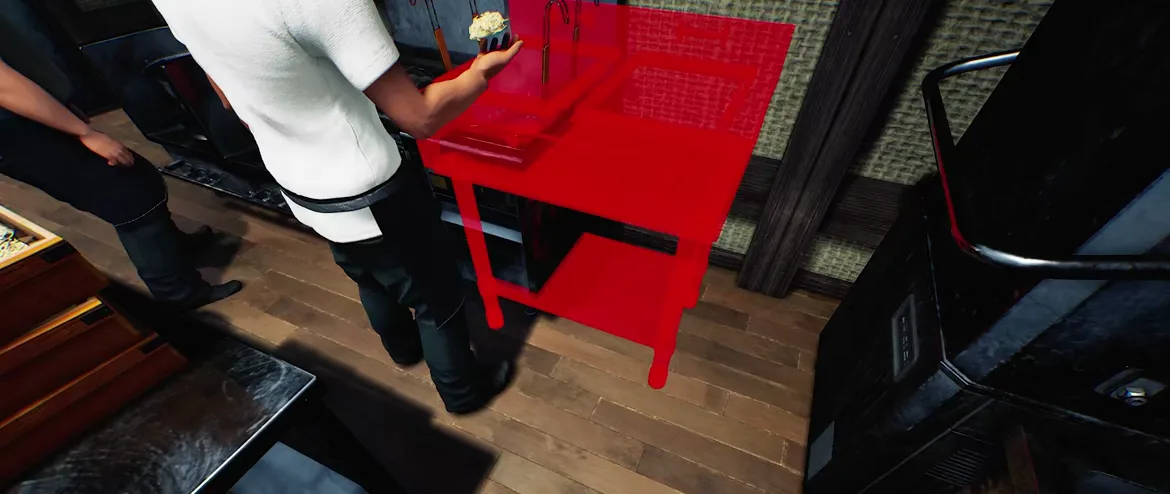
Carry an item and a translucent ghost follows it: green where it can go, red where something is already in the way.

Stations seenNoodle boiler · twin-well cooker · prep counter · cabinets

All visible in the store clips; exact counts, prices and footprint sizes per station are not published yet.

Seating seenBar stools · tables · benches

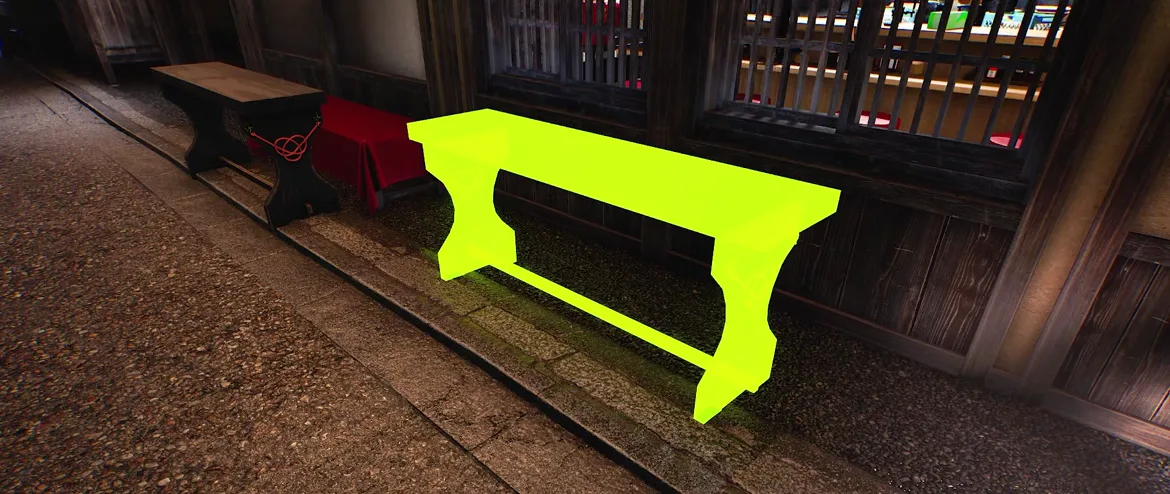
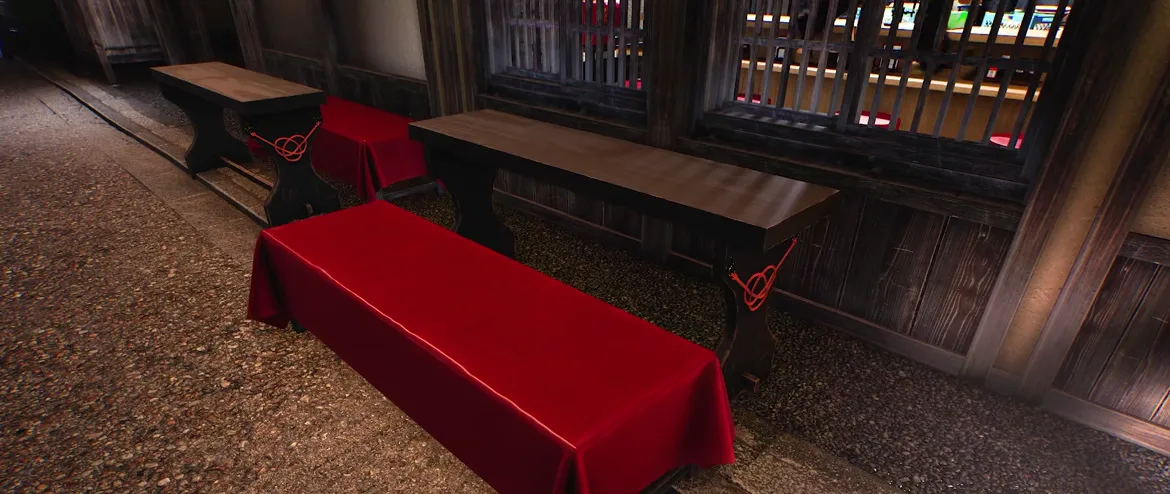
A bench glows green in front of the lattice window; other benches are dressed in red cloth with knotted red cords on the legs.

Day 1 patch (v0.1.48.17626) — layout-related official changes

  • Pin or unpin a placed chopping board with right-click; you can still prep on it while pinned.
  • Build mode now shows equipment names while you place items.
  • My Designs artwork can display on the Wide Noren curtain.
  • The starting shop sign can no longer be sold.
  • Dumbwaiter doors open automatically when the lift arrives.

OFFICIAL/changelog

Sources

Store-page frames were captured before and after the Oct 9, 2026 Early Access launch; placement rules can still change in future patches. The store page has no per-second deep link, so each step links back to the store page. Cross-check build-mode behaviour against v0.1.50.17746 on /changelog.

Interactive Shop Layout Planner

Use the planner to test a station and seating arrangement for your shop. Pick an item, click a grid cell to drop it, click it again to remove it. The flow score and tips update live. For rush service, see our rush-hour kitchen flow guide; for noren and decor placement, see the shop customization guide; patch-level layout tweaks are tracked on the changelog.

Layout Planner: arrange stations and seating, get a live flow score

Flow efficiency score
SITE MODEL
100/100

Placement cue: green = valid / red = blocked (seen in Steam store clips; the live build may differ) OBSERVED

Pick an item
Flow tips

✓ No major issues found

※ Site-model heuristic for planning only — not an in-game layout rating.

Current layout (copyable)

The Official Placement UI, Frame by Frame

Japanese Ramen Simulator placement mode with a two-tier stainless kitchen unit flooded solid red because its footprint overlaps the woven wall panel and the neighbouring counter, marking an invalid spot
FRAME 01

Red highlight = this spot is taken (store clip, 0:00)

A chef in a white coat is holding a two-tier stainless unit with two square wells on top. Wherever it overlaps the woven wall panel and the counter run beside it, the whole silhouette floods solid red. Red is the footage’s “you cannot drop this here” signal.

▶ 0:0000 · Steam store footage
📸 0:00 — the entire unit turns red where it would collide with the wall and the counter.
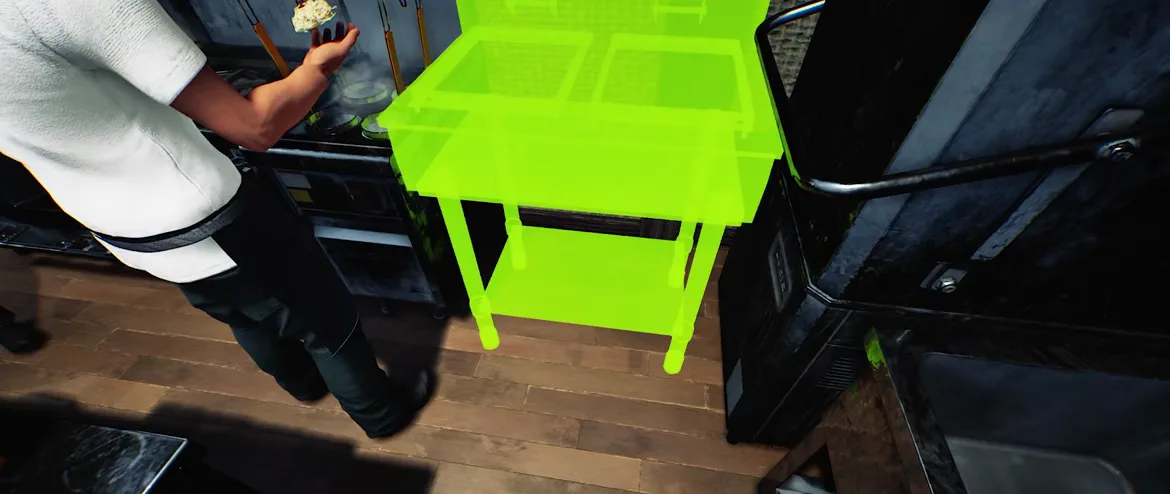
Japanese Ramen Simulator placement mode showing the same two-tier stainless unit flooded solid green once it is slid into the empty gap beside the black range, marking a valid placement
FRAME 02

Green highlight = it fits (store clip, 0:00)

Slide the same unit into the gap next to the black range and the ghost flips to solid green — same object, new position, now legal. The colour is only about whether that patch of floor is clear, never about the item itself.

▶ 0:00.5 · Steam store footage
📸 0:00 — one gap over and the ghost turns green.
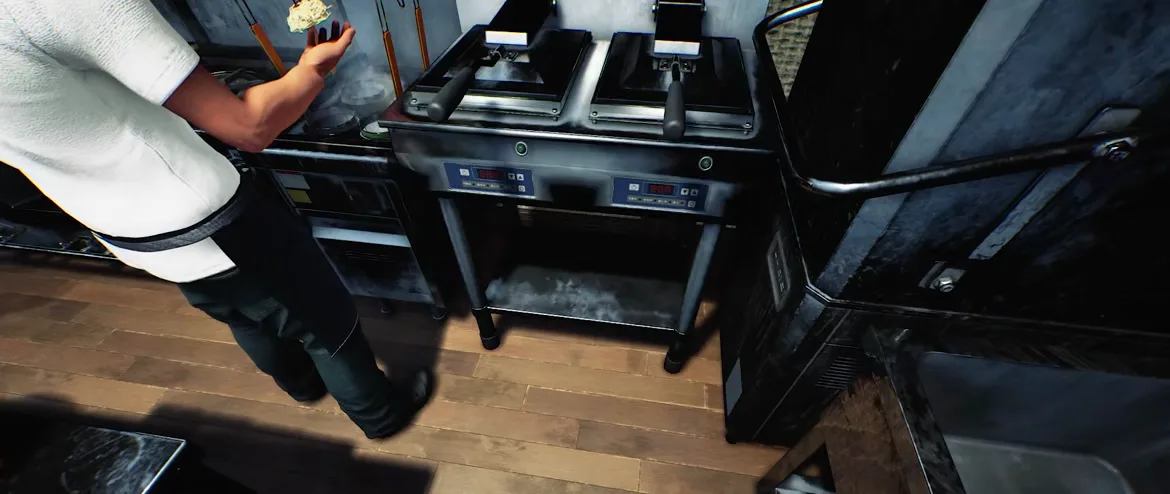
Japanese Ramen Simulator twin-well stainless cooking unit with two red LED control panels and a lower shelf, installed in the counter run after the placement highlight has been confirmed and cleared
FRAME 03

Ghost clears into solid equipment (store clip, 0:01)

Commit the placement and every highlight disappears. The unit now renders as real stainless equipment — two top wells, two red LED control panels on the front, an open shelf underneath — slotted into the counter run. Placement is physical: the appliance owns the floor you set it on.

▶ 0:01.2 · Steam store footage
📸 0:01 — highlight gone, the appliance is now part of the kitchen line.
Japanese Ramen Simulator noodle boiler counter with four round burners, long-handled wire noodle baskets hanging over them, a metal splash guard and visible steam
FRAME 04

The noodle boiler is a multi-cell station (store clip, 0:02)

A black counter run carries four round burner openings, each with a long-handled wire basket hanging over it and a tall metal splash guard behind, steam rising off the water. One boiler alone eats up a whole stretch of the kitchen band — budget floor space for it before you add seating.

▶ 0:02.5 · Steam store footage
📸 0:02 — four burners, four baskets, one splash guard: this is a wide station.
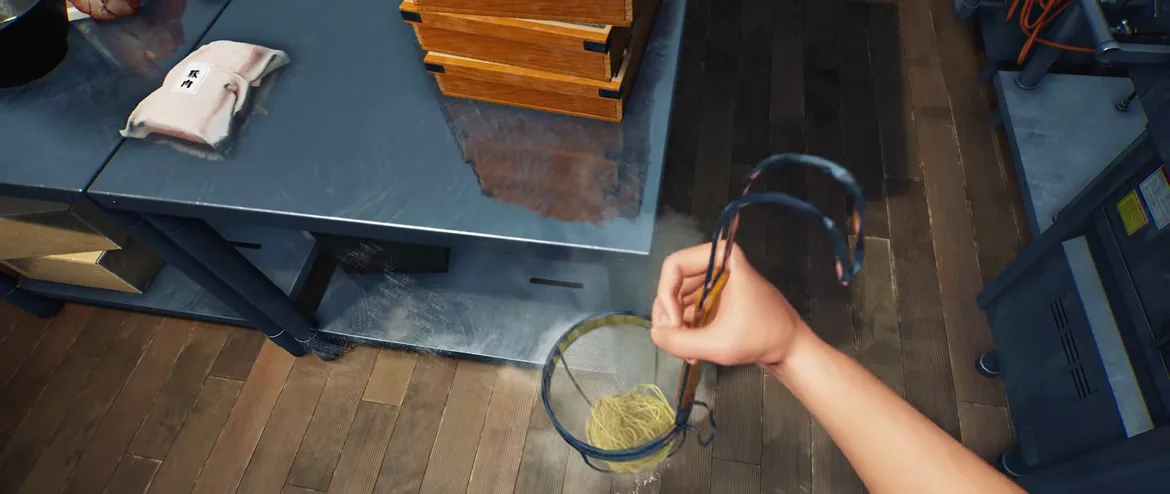
Overhead first-person view in Japanese Ramen Simulator of a hand lifting a wire strainer of cooked noodles over a stainless prep counter, with a vacuum-packed chashu portion labelled 豚肉 and stacked wooden noodle boxes beside it
FRAME 05

Prep counter, noodles and the chashu pack (store clip, 0:03)

Looking straight down over a stainless prep counter, a first-person hand lifts a wire strainer full of cooked noodles, water dripping, steam rising. On the same counter sit a vacuum-packed chashu portion labelled 豚肉 and a stack of wooden noodle boxes. Boiler, prep counter and pass within arm’s reach is the shortest bowl-to-guest route — the top-weighted rule in our score.

▶ 0:0003 · Steam store footage
📸 0:03 — noodles, chashu and box all on one counter.
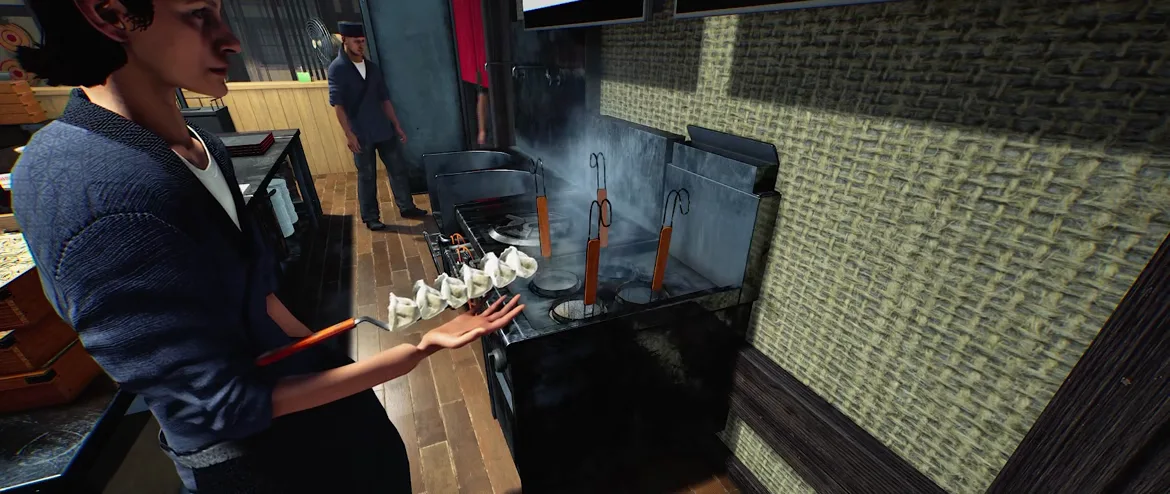
Japanese Ramen Simulator staff member in a blue work jacket carrying a chain of gyoza balanced on a long orange-handled spatula while walking the narrow floor strip between the woven wall and the kitchen equipment
FRAME 06

Staff walk the gap you leave between stations (store clip, 0:01)

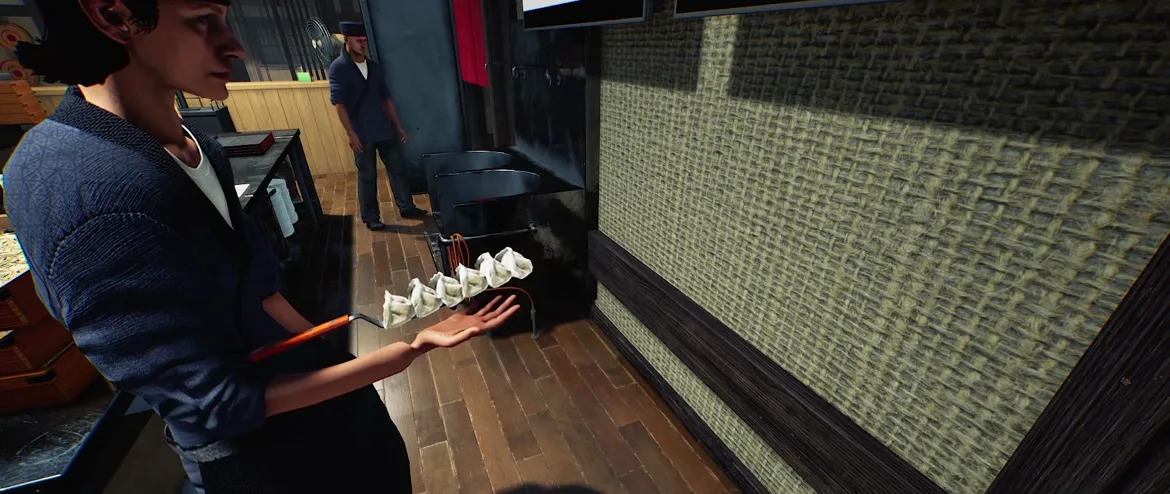
A staffer in a blue work jacket carries a whole chain of gyoza balanced on one long orange-handled spatula, walking the strip of floor between the woven wall and the equipment, while a second staffer in a navy samue waits by the doorway. Every extra metre of that strip is a trip they repeat all shift — which is why station-to-pass distance is scored.

▶ 0:01.5 · Steam store footage
📸 0:01 — this is the aisle your layout either clears or clogs.
Japanese Ramen Simulator dining area during placement with a long wooden bench flooded solid green in front of a lattice window to show a valid seating spot, already-placed benches and a red-clothed bench to its left
FRAME 07

Seating follows the same green rule (store clip, 0:03)

In the dining area a long wooden bench glows solid green in front of the lattice window — a valid seat placement. The already-installed benches to its left show what “done” looks like: bare wood tops, red knotted cords on the legs, one bench draped in red cloth.

▶ 0:03.2 · Steam store footage
📸 0:03 — the bench lights green where guests can actually sit.
Japanese Ramen Simulator dining row with no placement highlight showing a bench covered in glossy red cloth in front of dark wooden benches whose legs carry decorative knotted red cords
FRAME 08

Red cloth is decoration, not a “blocked” warning (store clip, 0:03)

Worth separating two things that both read as red: here the highlight is gone, and the red you see is the furniture itself — a bench draped in glossy red cloth plus knotted red cords tied to the bench legs. Only the flat translucent flood over a whole silhouette is the placement signal. We model just that one rule in the planner.

▶ 0:03.5 · Steam store footage
📸 0:03 — red cloth and red cords here are just the bench’s own look.
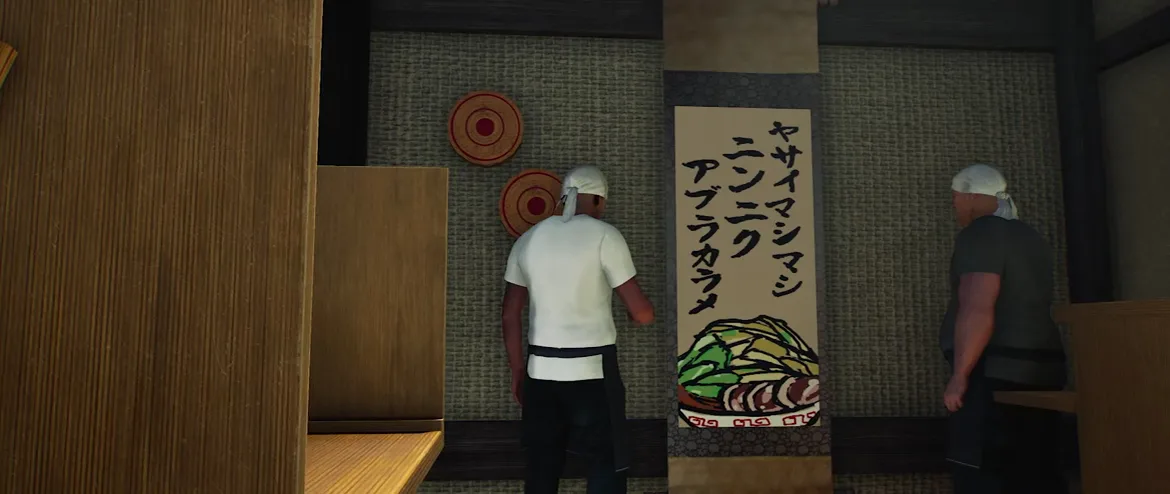
Japanese Ramen Simulator two cooks in white head towels facing a woven wall hung with a vertical calligraphy scroll reading ヤサイマシマシ ニンニク アブラカラメ above a painted ramen bowl, with two red-and-white round discs beside it
FRAME 09

Wall decor and the calligraphy order scroll (store clip, 0:04)

Two cooks in white head towels face a woven wall hung with a vertical calligraphy scroll — ヤサイマシマシ / ニンニク / アブラカラメ brushed above a painted bowl of ramen — plus two red-and-white round discs. Wall hangings like this are part of the shop dress, but whether the scroll’s topping codewords do anything in play is not yet verified, so we log it as ambience, not a mechanic.

▶ 0:0004 · Steam store footage
📸 0:04 — a brush-written scroll; the codeword meaning is still unconfirmed.

Frequently Asked Questions (FAQ)

Q1.How does placement work in Japanese Ramen Simulator?

The official footage shows a free-placement system: you carry an item and a translucent ghost follows it. The ghost turns green where the footprint is clear and red where it overlaps existing furniture or walls. Confirmed items render as solid equipment on the floor.

Q2.What do the green and red highlights mean?

Green means the item can be placed at that spot; red means it cannot because something already occupies the space. Note that some red in the footage is just decoration — the dining benches are draped in red cloth and tied with knotted red cords — so only the flat translucent flood over a whole silhouette is the placement signal. That green/red legend is what this planner reproduces.

Q3.What is a good kitchen layout for the ramen shop?

The store clips show the noodle boiler, prep counter and pass clustered together so a bowl travels the shortest distance to a guest. Keep every kitchen station in the back band, keep the middle aisle clear, and put seating in the front. The planner scores these relationships for you.

Q4.Is the flow score in the planner an in-game number?

No. The score is our own heuristic built from what is visible in the official footage — station-to-pass distance, seating in the dining zone, a clear aisle. Japanese Ramen Simulator has not published any in-game layout rating, so treat the score as planning guidance, not a game mechanic.

Q5.How many tables and seats can I place?

The footage shows bar stools, dining tables and benches, but the exact seat limit, item prices and footprint sizes per object have not been published. We only model one object per grid cell and avoid claiming numbers Wild Dog has not confirmed.

Q6.Can I rearrange my shop in the current Steam build?

Yes. Early Access went live on Oct 9, 2026 (build v0.1.50.17746). Free placement is in the live game; the store clips on this page are observed reference only. Day 1 patch notes cover build-mode labels, pin-able chopping boards, Wide Noren My Designs, the non-sellable starting sign, and dumbwaiter doors — see /changelog for the full list.