LIVEEarly Access since Oct 9, 2026Game v0.1.50.17746Steam reviews Very Positive · 91% (209)Facts checked Oct 11, 2026Patch notes →
STAFF SETTINGS — HIRE & ASSIGN

Japanese Ramen Simulator Staff Settings Guide (2026 EA)

Steam Early Access (v0.1.50.17746). Hire Staff, Register Staff Settings, $5/hr assign, Kitchen Store gear, Staff Noodle Boiler — JMXP + Max V2 Part 4 preview (EA may differ).

Unofficial fan wiki — not affiliated with Wild Dog or Steam.

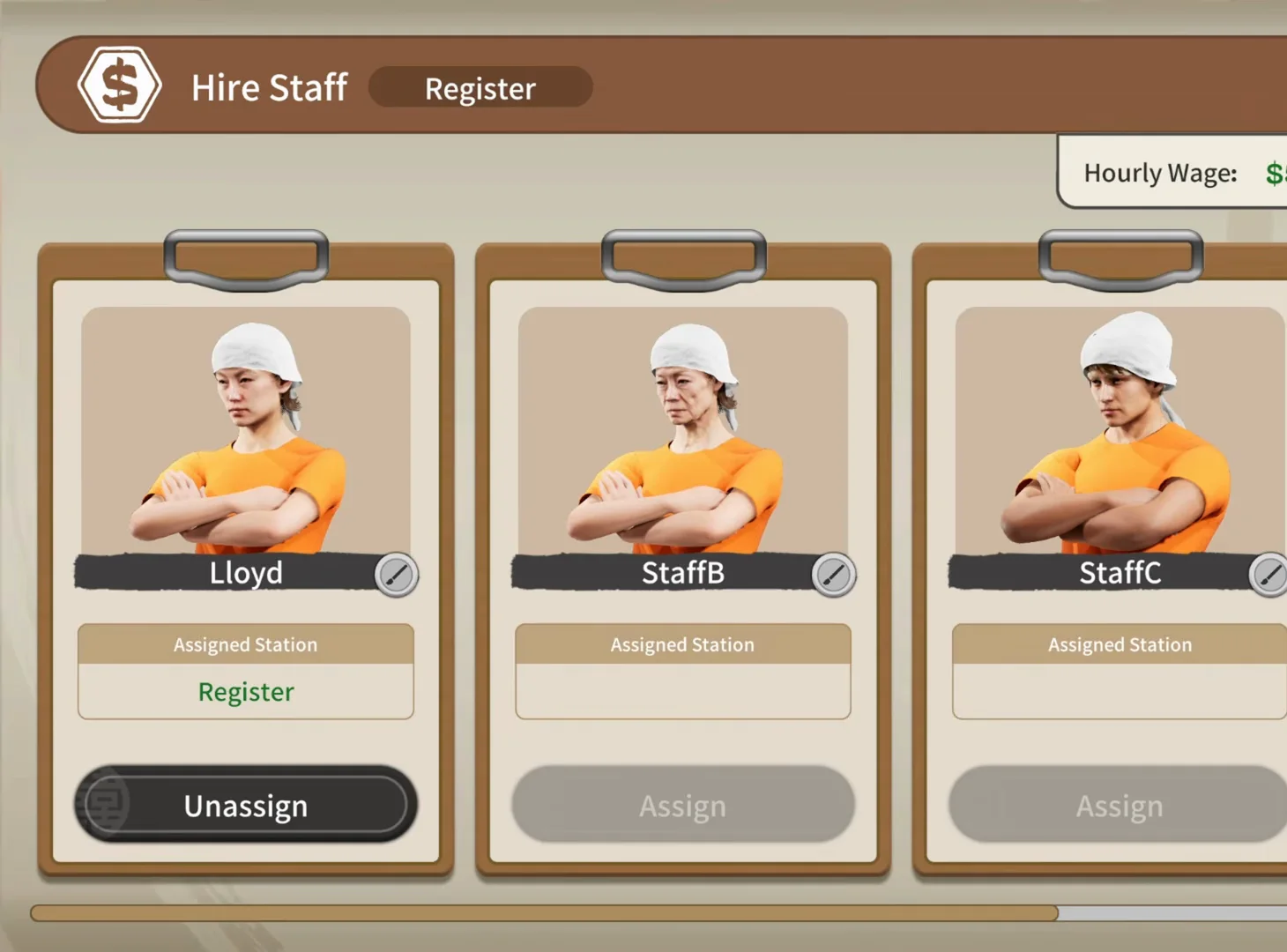
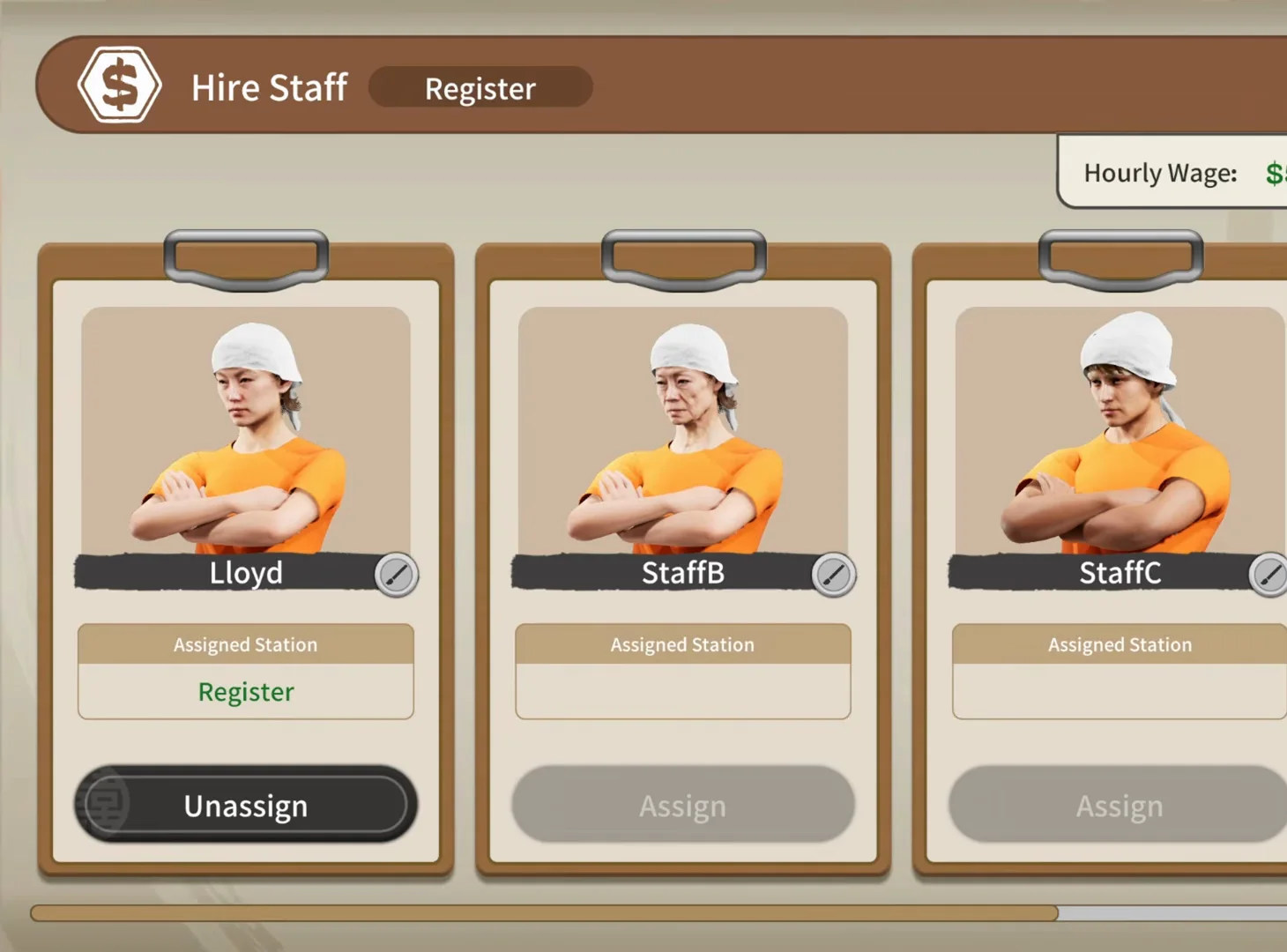
Japanese Ramen Simulator Hire Staff summary frame with Lloyd on the first clipboard, Register in green under Assigned Station, Unassign button, and StaffB StaffC on grey Assign
📸 Hire Staff overlay — Register assignment at $5.00/hr in preview.▶ Watch this beat in the source video: 32:25

Staff settings in 30 seconds

OBSERVED

Hire Staff → Register Staff Settings → buy staff gear → place Staff Noodle Boiler. Wages observed at $5.00/hr in preview.

  • Open Hire Staff — $5.00/hr banner (observed)
  • Register drawer → Staff Settings → assign Register
  • Rename via Enter Staff Name dialog (observed)
  • Kitchen Store + Staff Noodle Boiler in build mode
  • Dish staff assignment: /guides/dish-washing-guide

Day 1 — dish-clearing staff (official)

OFFICIAL

Day 1 patch adds dish-clearing staff who bus plates, trays, and bottles — assign them at the washer via Staff Settings (/guides/dish-washing-guide). Steam Day 1 patch · /changelog

Observed (JMXP Part 1 audio ~72:32–73:02): after day 4 the next-day unlock scroll lists Dishwasher and Plate Rack — no screenshot on this page because captured RESULT frames included channel overlays. Follow /guides/dish-washing-guide for verified washer UI and dish-staff Staff Settings.

Sources & verification footage

How we label data

This is an unofficial fan wiki. Each claim carries a source label so you can tell what the developer confirmed from what we estimated.

  • OFFICIALFrom the Steam store page, official announcements or patch notes.
  • OBSERVEDSeen in gameplay footage or hands-on builds; the release build may differ.
  • PLAYER REPORTReported by players on Steam; we have not reproduced it.
  • SITE MODELA calculation or estimate built by this site — not an in-game value.

Frames: JMXP Part 1 (Hire Staff right-cropped to remove facecam) + Max V2 Part 4 Kitchen Store — no facecam or channel tags. Differs from /guides/staff-hiring-guide. Wages/unlocks unofficial until Wild Dog publishes tables.

6-step staff settings walkthroughOBSERVED

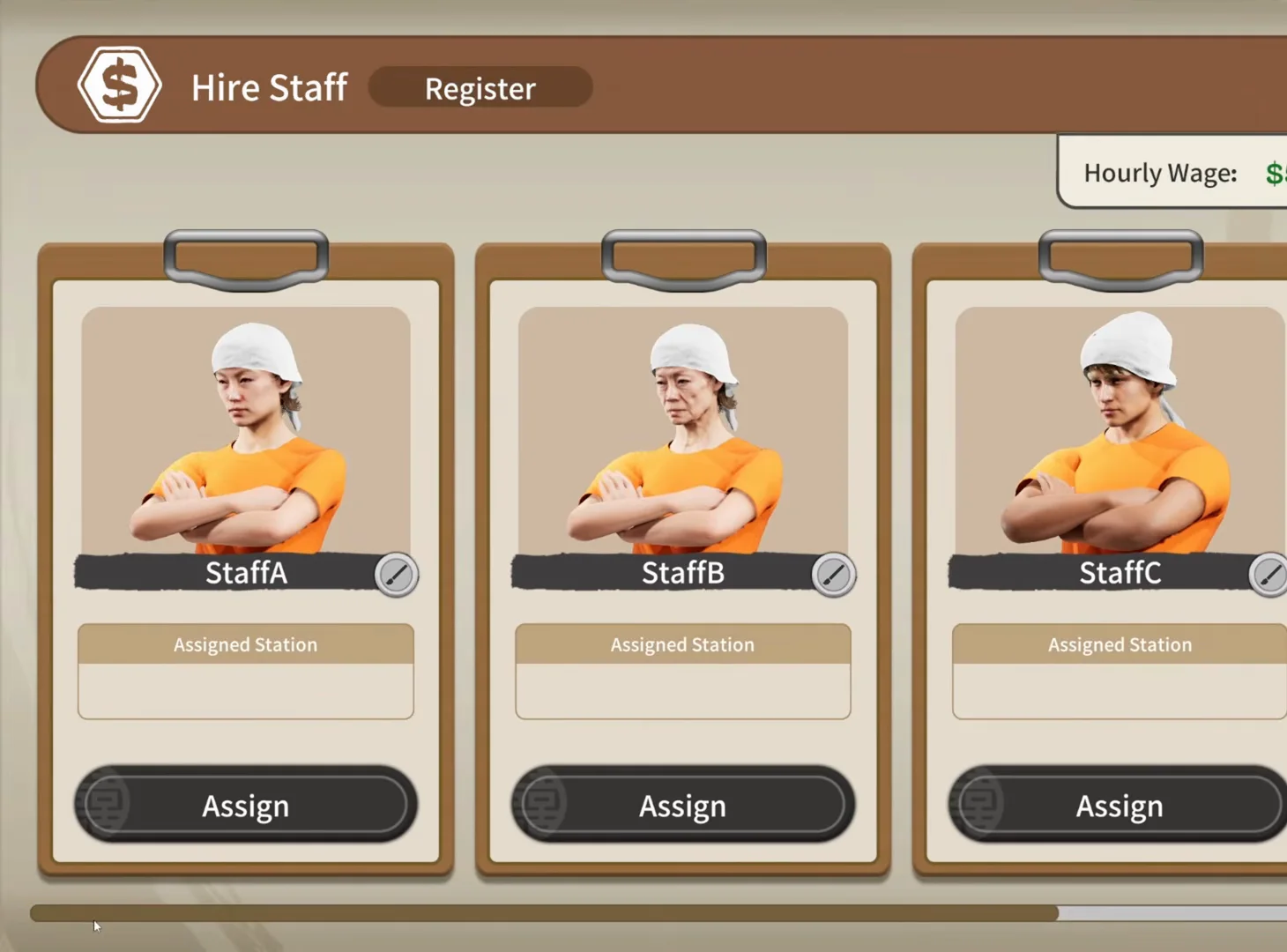
Japanese Ramen Simulator Hire Staff Register screen with StaffA StaffB StaffC pencil name fields, blank Assigned Station boxes, and Assign buttons below each clipboard
STEP 01

Step 1 — Hire Staff at $5.00/hr (Register tab)

JMXP Part 1 opens Hire Staff from the register flow with an Hourly Wage banner reading $5.00 per hour (observed preview). Three clipboards show pencil rename icons and grey Assign buttons. A fourth hire slot exists in longer runs but is cropped out of these frames (/guides/level-unlocks-guide). Not the Steam store hiring trailer on /guides/staff-hiring-guide.

▶ Watch this beat in the source video: 26:15
📸 Three open slots — tap Assign after picking a station in Staff Settings (observed).
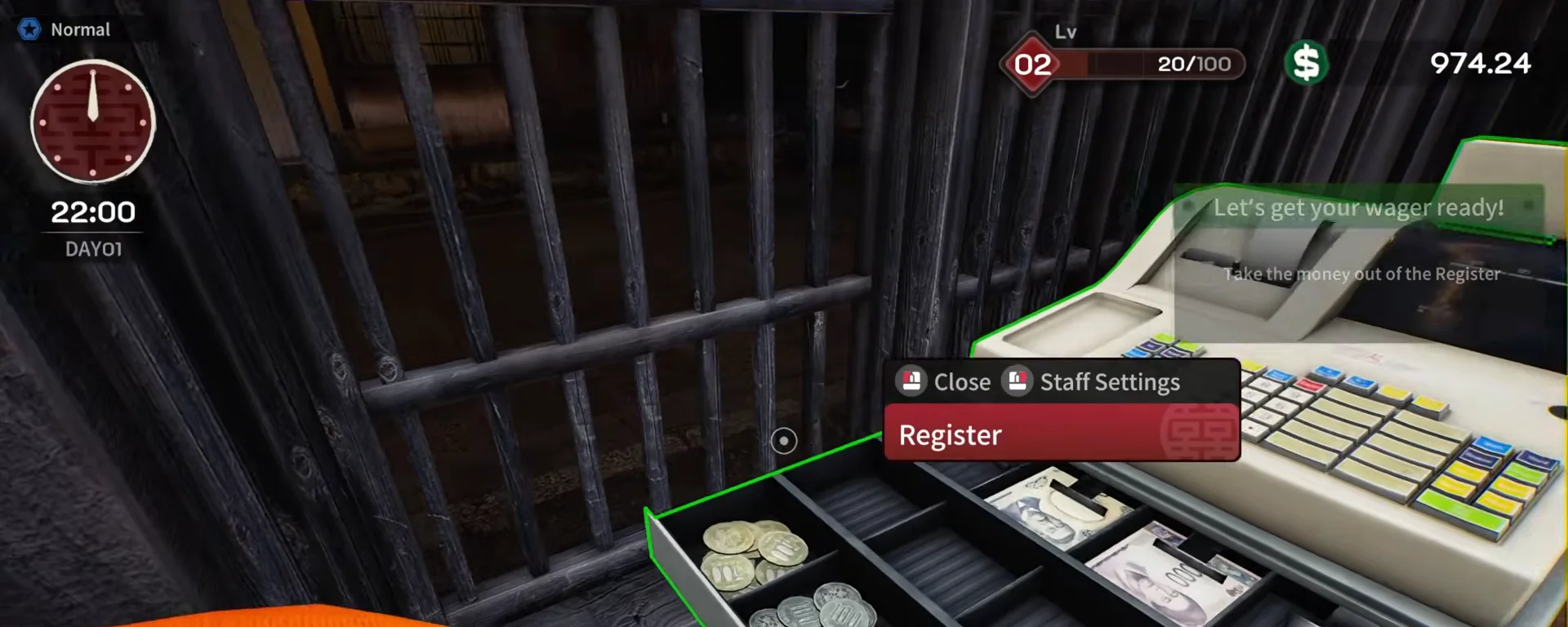
Japanese Ramen Simulator open cash register drawer with coin and bill trays and a Register interaction card listing Close and Staff Settings prompts on day 1 at 22:00
STEP 02

Step 2 — Register → Staff Settings

The preview run opens the physical register drawer, then selects Staff Settings on the Register interaction card (alongside Close). Other creators describe the same entry as right-clicking the register once part-time work unlocks around level 2 — see /guides/level-unlocks-guide and /guides/first-week-walkthrough.

▶ Watch this beat in the source video: 27:10
📸 Open the drawer, then pick Staff Settings on the Register card.
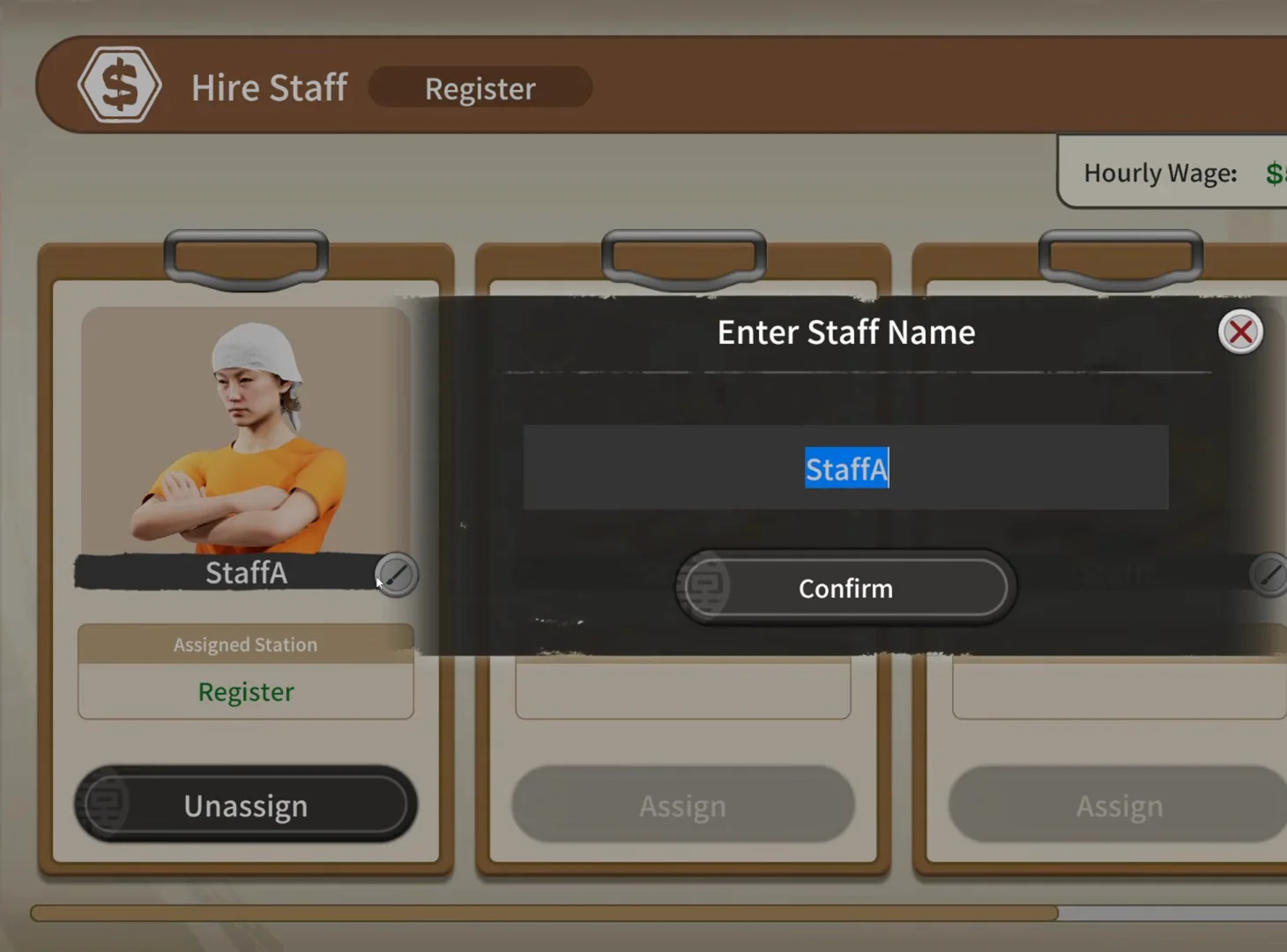
Japanese Ramen Simulator Enter Staff Name popup over Hire Staff with StaffA typed in the blue input field and Confirm button while the first clipboard behind shows Register in green and an Unassign button
STEP 03

Step 3 — Rename staff on the clipboard

The pencil icon opens Enter Staff Name; JMXP later calls the worker “Lloyd” in commentary (~32:10 — observed). Avatar art differs between clipboards, but the preview does not prove stat differences. Fourth hire slot and level gates are discussed on /guides/level-unlocks-guide, not shown in this crop.

▶ Watch this beat in the source video: 32:15
📸 Pencil → Enter Staff Name → Confirm (rename beat in preview).
Japanese Ramen Simulator Hire Staff first clipboard labeled Lloyd with pencil icon, Assigned Station Register in green text, and a dark Unassign button; StaffB and StaffC show empty stations with grey Assign buttons
STEP 04

Step 4 — Register assigned (Unassign / Assign buttons)

After Staff Settings, the first clipboard shows Assigned Station: Register with an active Unassign button while other slots stay on grey Assign (observed preview). JMXP mentions a $5/hr cashier; wage tables remain unofficial (/guides/staff-hiring-guide). Sink/noodle assignment from this menu is untested in Part 1.

▶ Watch this beat in the source video: 32:25
📸 Register assigned — Unassign returns the slot to open (observed).
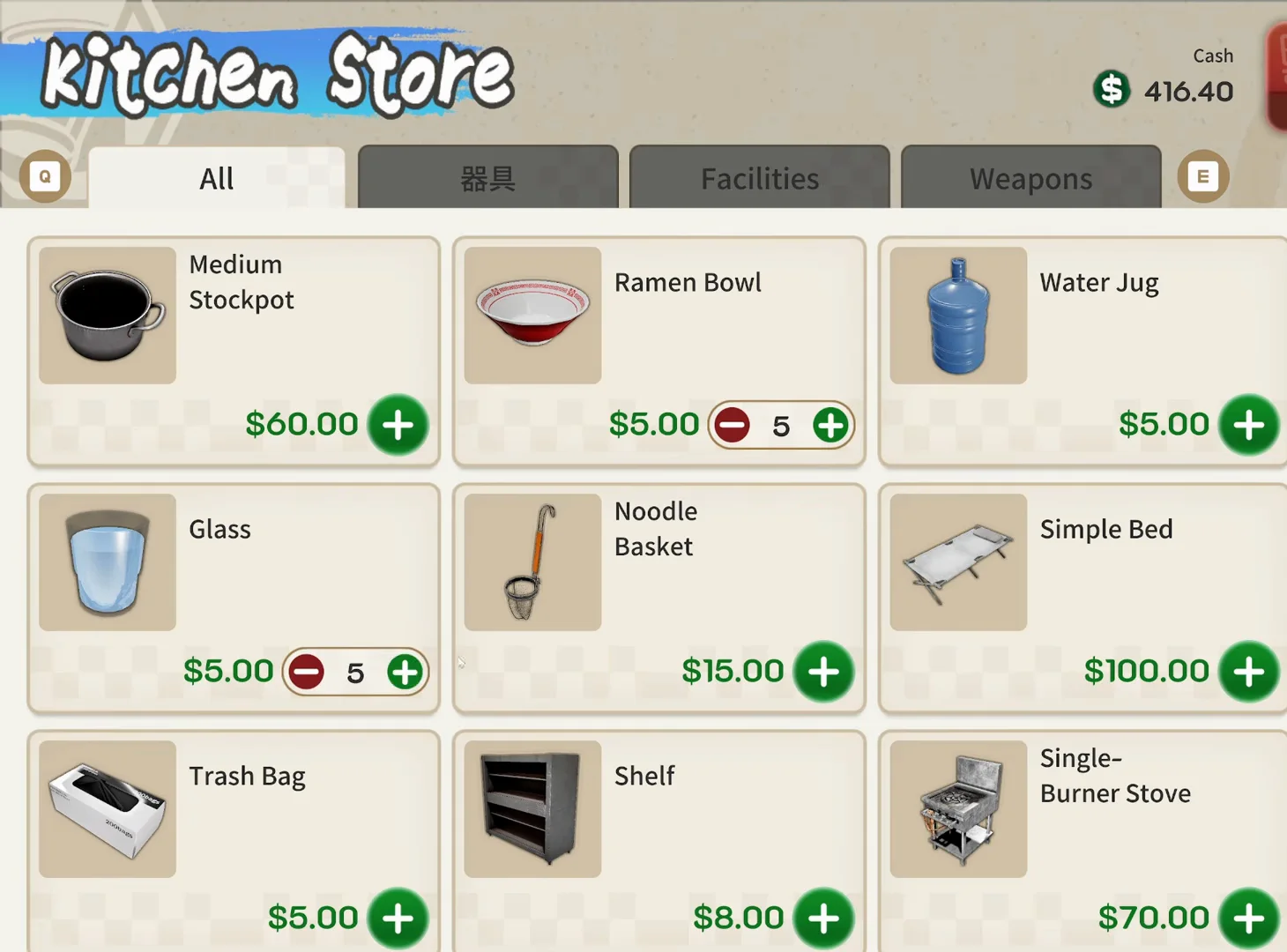
Japanese Ramen Simulator Kitchen Store All tab grid listing Medium Stockpot Ramen Bowl Water Jug Glass Noodle Basket and Simple Bed with quantity steppers and about four hundred sixteen dollars cash
STEP 05

Step 5 — Buy staff gear from Kitchen Store

The in-game terminal opens Kitchen Store (Equipment Shop). JMXP Part 1 buys cooking trays and later staff noodle gear from shop menus — this screenshot is from Max V2 Part 4 at the same UI (observed). Prices in your Early Access build may differ. Site ROI on /upgrades is owner-focused; staff equipment is preview observation only.

▶ Watch this beat in the source video: 25:08
📸 Terminal → Kitchen Store — clean Part 4 frame for the shop grid (JMXP buys trays here too).
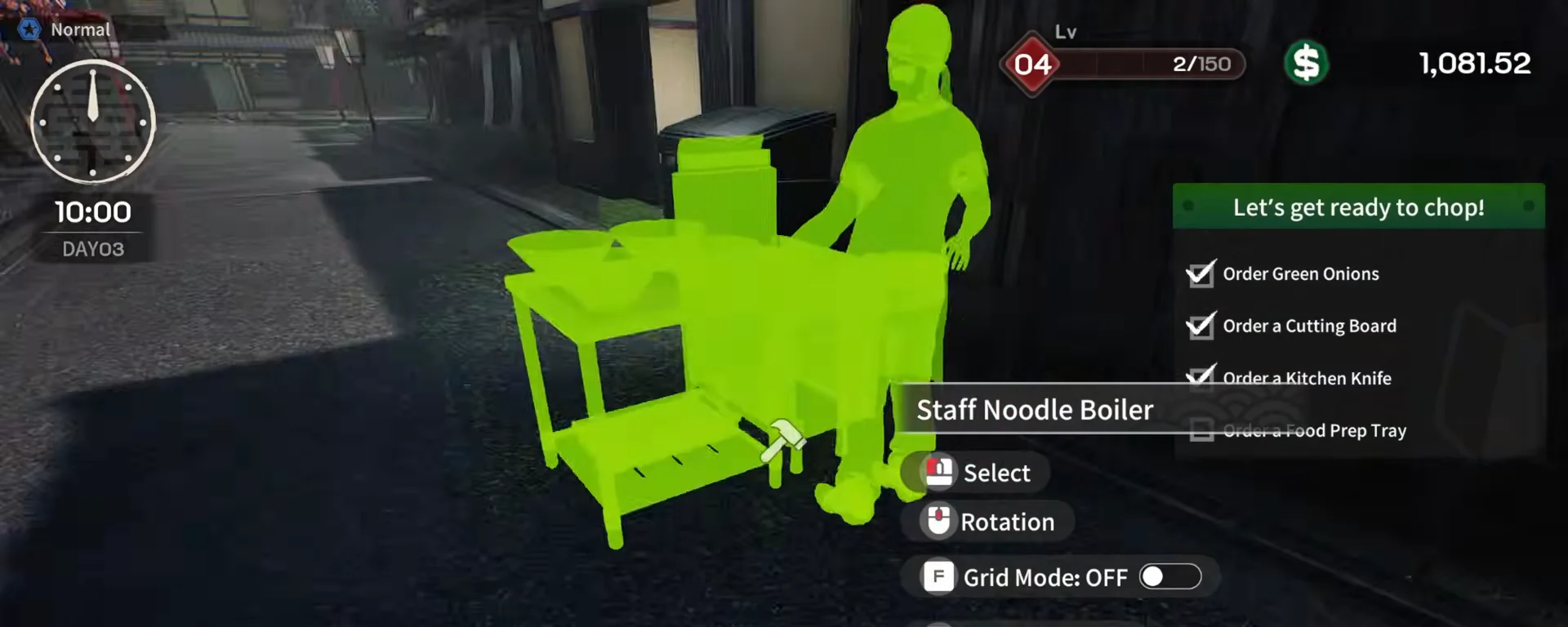
Japanese Ramen Simulator build mode green ghost preview of a Staff Noodle Boiler station with staff silhouette label and grid mode off prompt on day 3 at level 4
STEP 06

Step 6 — Place the Staff Noodle Boiler

JMXP places a Staff Noodle Boiler ghost in build mode — the label includes a staff silhouette. Commentary notes staff shift the kitchen toward “normal mode” layout rules, and later names a second worker “Boyd” at the noodle line while Lloyd stays on register (observed audio ~49:48 — no clean Boyd frame kept here). Soft/normal/firm presets for staff AI are mentioned in /guides/first-week-walkthrough. After day 4, JMXP narration lists Dishwasher + Plate Rack on the next-day unlock scroll (~72:32) — assign dish staff via Staff Settings in /guides/dish-washing-guide; we skip a screenshot because available RESULT frames carried channel overlays.

▶ Watch this beat in the source video: 47:22
📸 Placing Staff Noodle Boiler — later JMXP adds a second hire “Boyd” at the boiler (audio ~49:48).

Staff settings FAQ

Q1.How do I assign staff to the register in Japanese Ramen Simulator?

Creator preview footage: interact with the Register, choose Staff Settings, then assign the Register station from the Hire Staff clipboards at $5.00/hr (observed). Exact click vs. right-click wording may differ in Early Access — follow on-screen prompts.

Q2.Is this the same as the staff hiring guide on the wiki?

No. /guides/staff-hiring-guide covers whether solo NPC hiring exists (Steam store + Day 1 dish staff facts). This page is the click-by-click Staff Settings / Hire Staff UI from JMXP Part 1 preview runs.

Q3.Can staff wash dishes or boil noodles automatically?

Preview shows a dedicated Staff Noodle Boiler station and later dish-clearing staff at the washer (Day 1 official). JMXP could not assign sink washing from Staff Settings — treat unshown stations as officially unconfirmed.

Q4.How much do part-time staff cost per hour?

JMXP Part 1 shows $5.00 per hour on the Hire Staff banner when assigning the register (observed preview value). Wild Dog has not published wage tables — verify in your save.

Q5.When does the fourth staff slot unlock?

Creator previews (including ホワイト on /guides/level-unlocks-guide) padlock a fourth Hire Staff clipboard until shop level 3 with $5.00/hr banners (observed). Early Access may differ — cross-check your save.

Q6.Does v0.1.50 change staff tutorials?

Steam RSS v0.1.50.17746 mentions staff hint priority and My Ramen timing — not a full staff rebalance. Frames here are pre-release preview; compare /changelog after you patch.

Related pages